
Guide
Crew time tracking for landscapers.
Hours are the biggest cost in a landscaping job and the number least often recorded properly. Here is what to capture, how to handle travel and poor signal, and how to turn it into better quotes.
This is general guidance, not legal or payroll advice. We quote GOV.UK for the minimum wage point and link it at the end. Check your own situation with HMRC, ACAS or your accountant.
- Why bother
- What to capture
- Travel time
- Ways to do it
- No signal
- Approving the week
- Using the hours
- Questions
Why bother
- Pay. People are paid for the hours they worked. Estimating from memory on a Friday is how disputes start.
- Pricing. If you do not know how long the last three patios took, you are guessing the next quote. See how to price landscaping jobs.
- Contracts. A maintenance contract that is losing money shows up as visits that take longer than the price assumed. See garden maintenance contracts.
- Evidence. When a customer asks how long you were on site, you have the answer.
What to capture
- Who, which job, when they started and when they finished. Per person, not per crew; people join and leave jobs during the day.
- Breaks, if you deduct them, handled the same way every time.
- Travel between jobs, separately if you want to see it.
- A note when something unusual happened: a delay, a change from the customer, rain.
Keep it to two taps if you can. If recording time is a chore, it will not be done at the end of a long wet day.
Travel time
For minimum wage purposes, GOV.UK guidance on working hours lists "travelling from one work assignment to another" as working time, and says "travelling from home to a task or assignment will generally not be considered as working time for which the minimum wage is payable" (guidance last updated 23 October 2026). In practice, the time between the end of one job and the start of the next is usually paid time, and the commute to the first job and home from the last is usually not. Your contract of employment can be more generous. Check the details for your case.
This matters for a maintenance round with many short visits: the travel is a real part of each visit's cost and should be in your price.
Ways to do it
| Method | Good for | Watch out for |
|---|---|---|
| Paper timesheet | Zero set-up, any crew | Filled in on Friday from memory, then typed up again |
| Text message to the office | Quick, everyone has a phone | Messages get lost, typed up later, no link to the job |
| Shared spreadsheet | Free, flexible | One person edits at a time, no clock, easy to overwrite |
| Phone app clock in and out | Time recorded as it happens, linked to the job | Needs to work with poor signal and be quick to use |
No signal
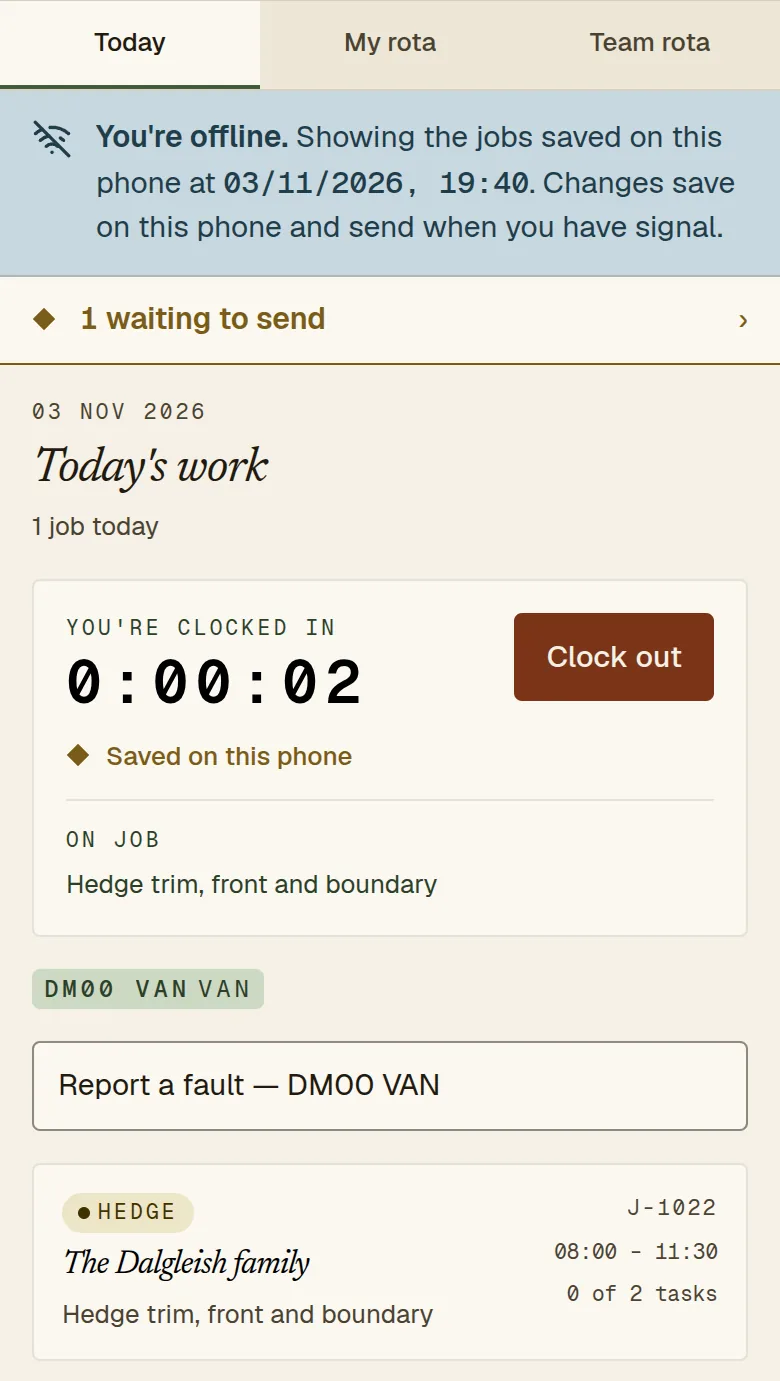
Gardens, estates and rural sites often have none. Whatever you use must cope: let people record the time on the phone and send it when they are back in range. Mark it as recorded offline, so that whoever approves the week knows the time came from the device rather than being typed in live, and can ask about it if it looks odd.
Approving the week
- Review once a week, not once a month.
- Look for entries left open, missing days and unusual lengths.
- When the office corrects a time, record who changed it and why, so the original is never silently overwritten.
- Only pay and cost jobs from approved time.
Using the hours
After each job, compare the hours you allowed with the hours it took. Keep a simple table by type of work: hours allowed, hours taken, difference. After a season you will know your real figures for patios, lawn renovations, hedge cuts or a typical maintenance visit, and your quotes will stop depending on guesswork.
Doing this in EasyUse
On the crew phone app, a worker clocks in and out of a job in two taps. If the time was recorded offline, the office sees that and has to approve it knowingly; bulk approval skips those entries. The timesheet shows approved time per person and job. If the office has to add a missing entry or close an open one, it records a reason and who did it, and never overwrites an end time the crew recorded. Payroll itself stays in your payroll software.
See the features page, try the live demo (made-up data), or read how the free pilot works.
Questions
What is the best way to track crew time in landscaping?
The one your crew will actually use at the end of a wet day. For most small firms that is a quick clock in and out on the phone, linked to the job, that still works when there is no signal.
Does travel between jobs count as working time?
For the minimum wage, GOV.UK guidance lists travel from one assignment to another as working time. Travel from home to the first job generally is not. Check your own contracts and circumstances.
What if someone forgets to clock out?
The office should be able to close the open entry and record the reason. In EasyUse an office user can do that, and the correction is marked on the timesheet.
Do I need GPS tracking?
Not to track hours. Clock-ins linked to a job and a weekly approval are enough for most small firms. EasyUse does not record where people are when they clock in.
How do I use time records to improve quotes?
Compare hours allowed with hours taken for each type of job and adjust your allowances.
Sources
- GOV.UK, Calculating the minimum wage: working hours for which the minimum wage must be paid, last updated 23 October 2026, checked 3 November 2026.
Related: How to price landscaping jobs, EasyUse vs spreadsheets.
Try it on your own firm
Free for 60 days, then £15 a month.
Read what is built on the features page, click around the live demo (made-up data), or see how the free pilot works.